It is not difficult to edit just a few pictures, but editing hundreds or thousands of photos taken during one shoot gets much more complicated. In such a situation, batch photo editing will come in handy and help you develop a workflow where you can make common edits for multiple photos and can give special attention to some special photos.
No matter whether you are a wedding photographer, real estate photographer, e-commerce retailer, travel photographer, or any other kind of content creator, a batch editing workflow can definitely save you time.
What Is Batch Editing, and How Is It Different from Single Photo Editing
Batch photo editing lets you edit multiple photos at once instead of one by one. Single photo editing, on the other hand, edits photos one by one, focusing on adjustments like specific retouching, object removal, skin correction, and compositing that cannot be applied uniformly across a batch.
None of the above-mentioned options make any of them better, but which one you need for your specific tasks matters the most. You can either choose batch editing if there are a lot of photos that require a similar kind of editing, or you can choose single-photo editing if there are few photos or photos that require specific attention to each one, or you can combine both to get results faster.
How to Edit a Large Batch of Photos
Step 1: Cull Before You Edit
Culling before editing helps you filter out uneditable photos so you can spend your precious time editing the selected, editable pictures. Remove:-
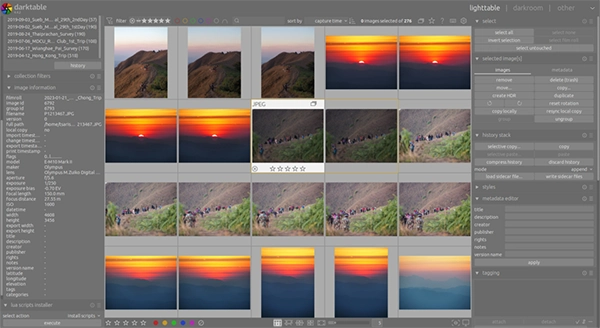
- Duplicate frames
- Accidental shots
- Severely blurred images
- Images with closed eyes or awkward expressions
- Poorly exposed frames that cannot be recovered effectively
- Unusable compositions
- Test shots
Step 2: Set a Base Edit and Sync Across Similar Shots
After selecting the editable pictures, group those photos shot under similar conditions to give them similar editing without breaking consistency, and focus on adjusting minor things for the base edit:-
- Exposure
- Contrast
- Highlights
- Shadows
- White balance
- Saturation
- Vibrance
- Color profile
- Lens corrections
Step 3: Batch-Apply Corrections
Batch editing helps mainly in this step, as the previous steps establish certain things, including grouping editable pictures and deciding the basic edit. Now, it is time to apply your basic edit and correct each picture repeatedly once you are satisfied with the results.
Step 4: Handle Image-Specific Fixes Individually
After applying the basic edit in the previous step, now try looking for the pictures that need special attention for the following reasons:-
- Unwanted people or objects
- Background distractions
- Skin that needs retouching
- Minor imperfections need to be corrected
- Difficult compositions requiring straightening
- Adjusting faces that are too dark
- Repairing areas affected by harsh lighting
Step 5: Export and Organize for Delivery
The process of editing doesn’t stop until it is delivered to the clients. So start by establishing a consistent file naming convention by naming your files like hassanwedding_001.jpg instead of IMG_4287.jpg. Different purposes require different specifications; for example, use the optimized JPEG format for the web, and suitable formats for different platforms and their requirements.
A simple structure would look like this:-
Project > RAW > selected > edited > web > print
Tools that speed up batch editing
The appropriate software will go a long way in handling many photos.
- Adobe Lightroom Classic is popular for catalog management, presets, synchronizing, rating, keywords, and batch export operations. This is especially helpful if one needs to keep consistency in large photo collections.
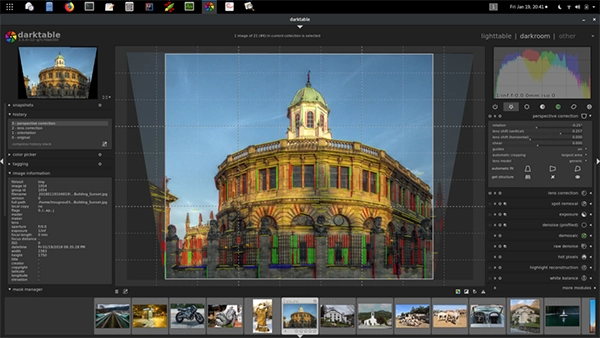
- Photoshop is good for individual photo editing. Some of its functions include retouching, removing objects, compositing, masking, and other image-specific manipulations.
- Capture One is also a popular software choice for those photographers who require professional RAW processing, color management, tethering, and batch processes.
There are automated photo editors that can do analysis of the photograph and do necessary corrections based on editing style they have learned. This can help to speed up the work, but still photographs have to be checked before sending to the client.
The best combination usually consists of several pieces of software. One can use a RAW editor for most of the batch processes and Photoshop for the photographs that need precise retouching.
Tips for optimizing batch photo editing workflows
Speed is not the only factor that saves you time; making the right decisions and working smart are important as well, so here are some tips that might be useful to you.
Create presets for recurring work
You can create presets if you shoot regularly under similar conditions, making your photos look similar. You might want to maintain separate presets for:-
- Outdoor portraits
- Indoor events
- Golden hour
- Studio lighting
- Product photography
- Real estate interiors
Edits in logical groups
Do not randomly jump from photograph to photograph. Process similar shots simultaneously. If the light and compositions are similar, then your corrections should be relatively consistent.
Separate global and local adjustments
Implement global modifications first, and then solve individual issues. It makes no sense to waste several minutes on editing a picture before getting its exposure and coloring right.
Use keyboard shortcuts
Learning keyboard shortcuts helps you save time while working. Learn some of the following:-
- Flagging
- Rating
- Copying settings
- Pasting settings
- Switching between images
- Zooming
- Comparing photographs
- Exporting
Don’t overedit
Don’t over-edit in the name of consistency: heavy sharpening, excessive saturation, extreme HDR effects, or aggressive skin smoothing result in an unnatural look. So, aim for decency in your edit, which looks polished and realistic at the same time.
Review the full collection before delivery
Before delivering the collection of your edited photos, it is a good idea to review it for the final time to avoid any risk of issues arising. What to look for? Look for:-
- Major exposure differences
- Inconsistent skin tones
- Different color temperatures
- Cropping inconsistencies
- Overly saturated images
- Under-edited photographs
- Export mistakes
How Visuals Clipping handles bulk photo editing at scale
When a project involves several hundred or even several thousand photographs, the editing process can take time away from capturing photos, communicating with clients, marketing, and growing the business.
Visuals Clipping provides photo editing services for photographers and businesses that need to edit a large number of photos. Bulk editing could be helpful in case of the need to perform such editing tasks as color correction, exposure corrections, retouching, background removal, and many others over a large number of photographs.
The key to a successful outsourcing process would be preserving the style that was envisioned by a photographer. The editing team must be able to edit photographs according to the provided instructions, presets, or samples for the resulting photos to match the rest of the collection. In case of frequent high-volume photo projects, outsourcing the editing process would help photographers keep turnaround times manageable while preserving time for creative processes.
Final thoughts
Compromising quality for speed is not what batch editing is referred to as, but synchronisation and repetitive corrections are its basis, the reasons for which batch editing is famous.
From culling to final review, photos go through many steps of improvement under the batch editing method, which helps you make your workflow faster, consistent, and repeatable for future projects.
From wedding e-commerce catalog to real estate shoot, you can cover any large project easily if you integrate this into your workflow, helping you save time and stay consistent.
Frequently Asked Questions
How many photos can be batch-edited per day?
It usually depends on the type of photography, amount of correction required, computer performance, software, retouching level, and time taken during culling and organizing.
Does batch editing reduce photo quality?
No, but the quality depends on editing software, source files, export settings, and adjustments applied. High-quality raw files can automatically provide you with enhanced quality in the edited outcome, but in general you need to check your export settings, as quality generally depends on them.
What’s the difference between batch editing and individual retouching?
Batch editing means making the same type of edits to many photos all at once. This is good for doing things like adjusting exposure and white balance. Photo retouching on an individual basis refers to the type of work that you do when you have only a few photos to deal with. Usually, a professional will use both methods.
Can I batch edit photos on my phone?
Absolutely, there are many photo editing applications available on phones that support presets, copied adjustments, and batch-style workflows. It can help you preview quickly and is convenient for social media and small collections. However, large collections need desktop software that can handle the kind of project, especially when working with raw files or detailed retouching.