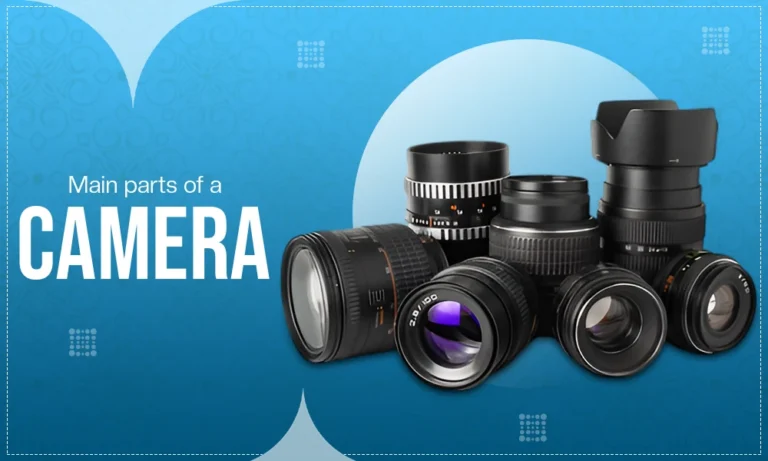
To enhance your photography capabilities, it is vital to comprehend the functions of each individual component of a camera since they all come together to create the final product. Each individual part of the camera controls the various aspects of light, focus, and image quality.
Each component works with one another to form a final image of an object or scene. For example, light enters through the lens, and is then recorded by the camera’s sensor as an image. If you understand how these various components operate, you will be better able to operate your camera and have greater control over creative shots you take with it. Below is an explanation of the primary parts of a camera and their respective functions.
Also Read: Mirror vs Camera
All the Parts of a Camera
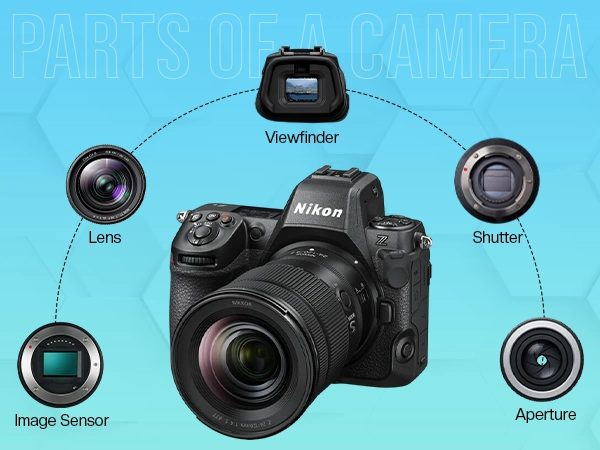
Now let’s take a look at all the external and internal parts of a camera. This includes:
Lens
The lens will collect and direct light to the image sensor to form a picture. The lens will directly affect the image sharpness that you obtain, the depth of field (how blurred or how sharp your photograph is) and composition of the photograph. Lenses are available with several focal lengths that allow the photographer to obtain wide-angle, standard and zoomed images.
Aperture
Aperture is an adjustable opening within the lens that controls how much light is allowed to come into the camera. Aperture also determines the depth of field of an image – depending on which aperture (f-stop) is selected, the image area outside of the focus point will either be blurred or in focus.
Also Read: Portrait Photography Tips
Shutter
The shutter determines how long an image sensor is exposed to light. A fast shutter speed will freeze movement in the photograph; a slow shutter speed would allow movement to be recorded resulting in blurring of the image. The shutter plays a major role in determining an image’s exposure, and is critical for capturing an image at either a high rate of speed or in an area where light levels are low.
Image Sensor (Digital Sensor)
The image sensor digitizes the light that comes into the camera and then records it in a file. The image sensor will dictate how big of an image you will be able to take, how true to life the color is, and how well the camera will be able to take pictures when it is dark. Larger image sensors are typically going to produce a higher-quality image than smaller sensors will.
Viewfinder
The viewfinder is to help you compose and take the picture before you take the picture. Optical viewfinders provide you with a real-time view of the scene you are going to photograph. Electronic viewfinders provide you with a digital representation of the picture you are going to take (with all of the exposure and other settings).
Camera Body
The camera body is what does all the work. The camera body holds everything, the sensor, the processor, other circuitry, and all the controls. The camera body provides, with structure, durability and ergonomics, a means for you to hold the camera comfortably and be able to use the camera in different environments.
Lens Mount
The Lens Mount lets you attach the lens to the camera body and ensures that the lens and camera are lined up properly so that they communicate, allowing the autofocus and aperture functions to work properly.
Lens Release Button
The Lens Release Button lets you safely remove a lens from the camera body. Pressing this button releases the lock on the lens mount, making it easy to change lenses to suit the kind of photography you are doing.
Mode Dial
The Mode Dial allows you to switch between different shooting modes (manual, aperture priority, shutter priority, or automatic) quickly and easily, depending on your photography experience and style.
Shutter Button
When pressing the shutter button, there are two basic functions, autofocus/pre-focus and photo capturing. The shutter button is the main means of releasing the shutter which makes the shutter button probably the most used control on the camera.
Autofocus System
The autofocus system finds the focus for you through sensors using various systems to automatically focus your lens when taking a photo. The autofocus system enables faster and easier shooting in fast-action situations by providing you with a clear picture right away
Reflex Mirror
In the case of DSLR cameras, the reflex mirror sends the light to the viewfinder, however, pressing the shutter button flips the reflex mirror up allowing the light through to the camera sensor so you can take the photo.
Pentaprism
A pentaprism is used to reflect, redirect, and correct the orientation of a visual image from the reflex mirror to the viewfinder of a camera. The pentaprism enables you to see what will appear in the camera’s viewfinder as you expect, i.e., right side up and right side out.
Focusing Screen
Focusing screens enable you to see the actual image that the lens produces and to guarantee your subject matter is in clear focus. A Focusing screen is used in conjunction with a viewfinder to give a true preview of the image before you take it.
Built-in Flash
The built-in flash provides a flash of extra illumination in low-light situations, such as indoors and outside at night, to provide light to the subject and to decrease shadows. The built-in flash is an essential part of indoor and nighttime photography when there is inadequate natural light.
Flash Button
With the flash button, you can activate/disable your camera’s built-in flash, as well as manually make any adjustments based on creative preferences or available light.
Hot Shoe
The hot shoe mounts external photo accessories (flash, microphone, or trigger) to the top of your camera so you can expand your camera’s potential for professional photographic work.
Main Dial
You can adjust shutter speed, aperture, or exposure compensation with the main dial quickly and easily, allowing you to make adjustments for any changing light levels.
Function Buttons
The function buttons grant quick access to often used options, enhancing productivity by significantly decreasing the amount of time required to navigate through menus while taking photographs.
Image Processor (Processing Engine)
The processing engine converts raw data from the image sensor into the final image. While converting the raw image into a completed image, the image processor undertakes many required functions such as noise reduction, color correction, and compression, all of which directly affect the overall quality of an image, as well as processing speed during production.
Memory Card Slot
The memory card reader slot is used for storing images and video clips captured with your camera. This slot supports a diversity of card types on every given card type, therefore providing the photographer with the ability to save, transfer, and manage their photographic media in an efficient manner.
Buffer
A buffer is temporarily storing photographs while in continuous or rapid mode. In doing so, it allows you to take multiple images rapidly without needing to wait on each file being saved onto your card.
Communication Ports
Communication ports allow your digital camera to communicate with other devices like computer, microphone (if applicable), monitor, etc by transferring data between the two, charging the camera’s battery, and extending the functionality of the camera.
Tripod Mount
The tripod mount is a threaded hole located at the base of the camera that provides a secure attachment to a tripod for added stability while shooting in long exposure, low-light or video mode.
Grip
The grip offers the photographer a stable and comfortable method of holding the camera, especially beneficial when using larger lenses for extended periods of time.
Battery
The battery supplies power to operate the camera’s functions like capturing photos, processing data and providing display images, battery life varies based upon usage, spare batteries are necessary for extended periods of shooting.
Zoom Elements
Zoom components inside the lens enable the photographer to change the focal length and therefore create the zoom effect without changing their physical distance from the subject, meaning more flexibility when composing images for photographers.
Contacts
Contacts are small metallic devices that connect the lens to the camera body and enable electronic communications between the two devices thereby allowing the features of autofocus, image stabilization and aperture control to function as designed.
Remote Control Sensor
The remote control sensor allows you to wirelessly trigger the camera using a remote control. A remote control is useful for taking self-portraits, long exposures or reducing camera shake.
Stabilization System
Stabilization systems compensate for camera shake in order to create sharper images than would otherwise be possible. This is particularly useful in low-light situations or when shooting handheld without using a tripod.
External Flash Hot Shoe
The external flash hot shoe provides a safe and sturdy way to attach mounting flash accessories used on all types of professional camera equipment; thus allowing for better control over light.
Articulating or Tilting LCD Screen
Articulating or tilting LCD screens allow the user to manipulate the position of the display for more convenient shooting (either very high, very low or at unusual angles). They are of great benefit for those engaged in vlogging and making video recordings, as well as those engaging in other artistic compositions.
Touchscreen Interface
The touchscreen interface of modern cameras provides the user with a simpler way to navigate through the camera menus, set camera functions, and select focus points. Because of this, they greatly improve the overall usability of the camera and can speed up the process of operating the camera overall.
Why Even the Best Camera Parts Need Professional Photo Editing
Understanding your camera’s image sensor and mastering your aperture will undoubtedly improve your photography. However, a camera cannot fix a cluttered background, perfectly isolate a subject, or remove a distracting reflection from a product.
That’s where post-production comes in. Whether you are a beginner looking to remove a background or an e-commerce seller needing pixel-perfect clipping paths, Visuals Clipping is your final step. We take the raw data captured by your image sensor and turn it into a flawless, professional final image.
Conclusion
An understanding of various camera components will empower you as a photographer to take more responsibility for your images than merely relying on the auto mode of your camera.
Understanding how each component (lens, sensor, buttons, and dials) of the camera functions, will enable you to creatively manipulate the exposure, focus technique, and composition of an image. Mastering this knowledge will help you achieve technical expertise and produce stunning photographs that meet the professional standard of quality. For more such informative blogs check out the blogs section of Visuals Clipping.
Frequently Asked Question (FAQs)
What are the main parts of a camera?
Ans: The main parts include the lens, sensor, shutter, aperture, and viewfinder. These components directly impact how light is captured and transformed into a photograph.
How does a camera work?
Ans: A camera works by allowing light to pass through the lens and aperture, controlling it with the shutter, and capturing it on the sensor to create an image.
Why is the camera sensor important?
Ans: The sensor determines image quality, resolution, and low-light performance. It converts light into digital data, making it one of the most critical camera components.
What does aperture control?
Ans: Aperture controls the amount of light entering the camera and affects depth of field, allowing photographers to create sharp or blurred backgrounds.