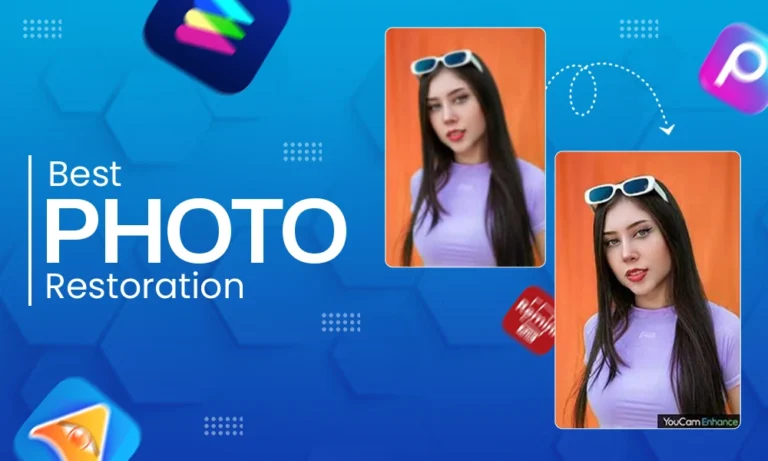
Photographs from the past may be filled with feelings and history, but as we all know, age can take a toll on those pictures and many become faded, scratched, or damaged over time.
Whether you are interested in doing simple retouching, accurately color correcting your photographs, or performing advanced hair masking, AI-based applications will give you impressive results in no time.
The app you choose will have a huge impact on how much you improve your family photo albums or improve the quality of your vintage photographs. In this post, we will take a look at the top photo restoration applications of 2026, and discuss how they can help you recreate your special photographs with accuracy and ease.
Also Read: Photo Retouching vs Photo Editing
What Are Photo Restoration Apps and Their Benefits
Apps for photo restoration are digital tools used to fix, enhance, and improve vintage or damaged images. These apps use artificial intelligence to repair imperfections such as water damage, scratches, blurriness, and discoloration, along with other sophisticated methods of digital editing to repair your photos.
Photo restoration app benefits:
- Automated photo retouching allows for a fast way to restore images without professional editing skills.
- Color matching and color correcting will restore natural color to your photo and make your faded or black-and-white images vibrant again.
- Hair masking and refining details will help keep fine details, including strands of hair and edges, to help ensure the most precise edits possible.
- Time and money saved by using an app is more than with manual and/or professional restoration.
An app is easy for all levels of users, from novices to professionals, providing a quick, efficient solution for photo restoration.
Top 5 Photo Restoration Apps of 2026
Now let’s take a look at 5 best photo restoration apps available. This includes:
1. Renew Photo Restoration App
Renew is a simple way for beginners to use their smartphone application and have their old and worn-out images brought back to life really quickly using Artificial Intelligence. It is designed primarily to allow you to quickly retouch your photos.
Removing scratches, blurring, and minor flaws with just a few clicks. There are also basic tools available for colour correcting using this application which makes it a good choice if you would like to get a quick look. Automatic result and avoid having to go through the hassle of doing any detailed editing.
Pros:
- User interface is easy to use
- AI-based restoration occurs very quickly
- Suitable for retouching photos
Cons:
- Limited ability to use advanced editing tools
- Have less control over detailed adjustments
2. YouCam Enhance
YouCam Enhance offers high-quality photo restoration powered by Artificial Intelligence. In addition, this app includes advanced retouching and sharpening features as well as tools for reducing noise within images.
Within YouCam Enhance’s color matching and correction features, you will find that natural tone restoration is accurately achieved, making it appropriate for both casual users and those seeking a polished look with high-resolution output.
Pros:
- Strong AI enhancement tools
- Excellent color correction
- High-resolution output
Cons:
- Some of the features are provided on a paid basis.
- To use YouCam Enhance, you must have a stable internet connection.
3. Remini AI Photo Enhancer
Remini has been known to fix and sharpen blurred and out-of-focus faces with advanced AI. The main advantage it has is the facial restoration, where it applies the latest technology to improve the quality of poor portraits to the highest level of definition and sharpness.
The software can also rejuvenate colors of bygone days giving your old photos the brilliance of brightness you never had before.
Pros:
- Great for facial improvements
- Fast speed of processing
- Good for restoring portraits
Cons:
- Limited functions available when manually editing
- Free trial will display a watermark
4. Picsart AI Photo Restoration
Incorporating a creative edit and restore style, Picsart offers users a better way to set up their edited pictures. In addition to offering photo retouching, manual as well manual correction, and the ability to do color matching.
It also has hair masking and supports detailed editing, making it a great choice for users looking to combine their creative flexibility and their restoration needs.
Pros:
- Multiple editing options
- Good manual control
- Good for Detailed Edits
Cons:
- Can be complicated for the novice/ beginner
- Some of the features are behind a paywall
5. VanceAI Photo Restorer
VanceAI Photo Restorer is a photo restoration tool that is professional-quality and recognized for its capability to restore damaged and faded pictures accurately and with a high level of quality using advanced AI technology to repair deep scratches on photographs.
The application offers advanced capabilities to do so in addition to performing accurate colour correction and hair masking, to provide you with realistic-looking, detailed restorations of old, damaged photos.
Pros:
- Effectively removes scratches, noise, and discoloration
- Has advanced AI technology capable of restoring images
- Easy-to-use, beginner-friendly interface
Cons:
- Must subscribe to have access to all features
- New users may need to familiarize themselves with the program before using it effectively.
Photo Restoration Apps Comparison: Features, pricing and Platforms
Now let’s compare each of the apps –
| App Name | Best For | Key Features | Ease of Use | Platform | Pricing |
| Renew Photo Restoration App | Quick basic restoration | AI retouching, scratch removal, basic color correction | Very Easy | Android, iOS | Free + Paid |
| YouCam Enhance | High-quality AI enhancement | Advanced retouching, color correction, sharpening | Easy | Android, iOS | Freemium |
| Remini AI Photo Enhancer | Portrait and face enhancement | Facial retouching, AI sharpening, color enhancement | Very Easy | Android, iOS | Freemium |
| Picsart AI Photo Restoration | Creative + manual editing | Retouching tools, color matching, hair masking | Moderate | Android, iOS, Web | Freemium |
| VanceAI Photo Restorer | Professional restoration | Advanced AI repair, color correction, detail recovery | Moderate | Web | Paid |
Also Read: How much does photo editing cost?
Conclusion: Which Photo Restoration App is right for you?
In 2026, Photo Restoration Apps can bring old memories to life again through artificial intelligence. All the features that you would want with these types of apps include photo retouching, color correcting, and hair masking, all of which will result in a quick and effective job of restoring your old photos.
Each application has its advantages and disadvantages, the choice will depend on your requirements as well as your expertise. Combining professional editing and using restoration application tools will achieve optimal results in terms of quality and durability when restoring your photographs.
Also Read: AI vs Manual Photo Editing
FAQs
Q1. Which is the best photo restoration app in 2026?
Ans: The best app depends on your needs. Remini is great for portraits, while VanceAI offers professional-level restoration.
Q2. Can AI fully restore damaged photos?
Ans: AI can significantly improve photos, but severely damaged images may still require manual or professional editing to avoid unnatural, AI-generated distortions.
Q3. What app is best for photo retouching and color correction?
Ans: YouCam Enhance and Picsart are excellent choices for both retouching and accurate color correction.
Q4. Which tools are best for hair masking in photo editing?
Ans: VanceAI and Picsart provide strong hair masking tools that preserve fine details and edges effectively.