Images have to be resized for several reasons: to submit in an application, to post on social media, to reduce file size, etc.
But installing new software for such work that you do once in a couple of months is not ideal at all. There are several online platforms that allow users to edit, crop, resize, nd ltyer their images efficiently. This saves both your time and your storage.
In this blog, we will explain how you can resize your images online, tools that are best for this work, and some tips to maintain good image quality after resizing.
What Do We Mean When We Say “Resize an Image”?
When we talk about resizing an image, what it includes is changing the width, height, or twice of them of the image.
This means that we take a large-sized image and resize it to a smaller size to fit a particular place or site. An image’s dimensions are usually its width and height. That is measured in pixels.
File size consists of the amount of storage space the image uses. This is something like 500 KB or 2 MB. The two are related, but they are different. When you decrease an image’s dimensions, the file size also reduces.
Why Do You Need to Change Image Size?
Changing an image’s size is very useful for different purposes. Changing an image size can make your file smaller and easier to upload.
In many cases, websites and online platforms have specific image size requirements. You have to need to change the image size when uploading them to forms or any online application.
Smaller images consume less storage space and upload more easily. In addition, for websites, resizing images can make the process quicker.
How to Resize Images Online Without Installing Software
You can resize images online using different online platforms. Each tool has a slightly different interface and resizing method, but they are all very easy and handy to use. Here are three popular options and how they work.
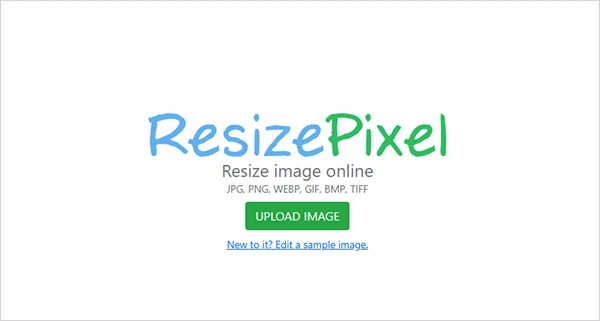
Many image editors include resizing options with advanced features. However, advanced applications can be expensive and complicated to use. ResizePixel provides a simple way to resize images online for free. You can change the image dimensions (width and height) in pixels with just a few steps. It accepts images in the PNG, JPG, GIF, WEBP, TIFF, and BMP formats. It also allows you to keep the original image’s aspect ratio. This will help to avoid a drop in image quality of your image.
How to Resize an Image?
- Go to ResizePixel and select the image you want to resize from your device.
- Input the new dimensions for the width and height of the picture in pixels.
- Resize the picture using the new values and then download the picture from the download page.
Resize Images Online with iLoveIMG
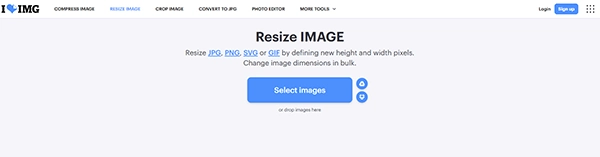
iLoveIMG is a browsing tool that lets users resize images quickly and easily. Installation of any software is not needed for this. This online tool also lets you resize multiple images at once. Users can resize images in pixels or as a percentage. It is compatible with formats such as JPG, PNG, and GIF. Users have the choice of maintaining the aspect ratio of the original image.
How to Resize an Image?
- Go to iLoveIMG and upload the picture that needs to be resized.
- Select the pixels or percentage depending on how you wish to resize your image.
- Set the required width and height, and then click to resize the image.
- Download the resized picture in a single step.
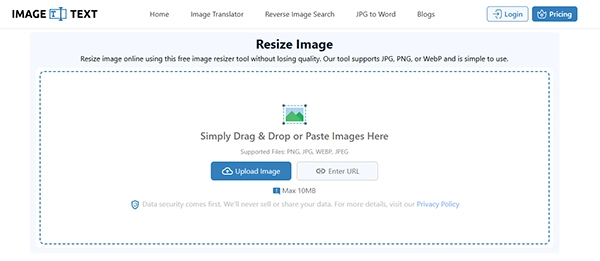
Image Resizer by imagetotext.me is a free online website that helps in resizing images in seconds. It offers options to adjust image sizes to meet your requirements. The Image Resizer also allows you to resize images in percentage mode. It serves predefined sizes for various social media websites. No software installation or design knowledge is needed.
How to Resize an Image?
- Go to the Image Resizer tool on imagetotext.me and add the image file from your device.
- Input how you would like to resize your image – via dimensions or percentage.
- State the necessary width and height or choose a pre-defined social media size.
- Set the export parameters you want and select the image format.
- Press the Export button and save the resized image.
How to Resize Images without Compromising Image Quality
- Maintain the original ratio of the image to prevent the image from being distorted.
- Resizing an image to a larger size will make it blurry and pixelated.
- Before downloading the image, check the resized image for high quality.
- Avoid resizing the same image many times.
Common Problems When Resizing Images Online
Here are some common problems that appear when resizing images online.
Blurred Image
Sometimes an image becomes blurred when you resize it. This happens because of insufficient pixels in the original image. Use ideal sizes when working with images.
Stretched Image
Images can look stretched out when their width and height ratios are too different. It is important that when you are resizing an image, you should maintain the original aspect ratio.
File Size Remains Too Large
Reducing the dimensions is not enough to decrease the file size sometimes. Smaller dimensions and lower image quality are also good for decreasing the file size. A good format can also help reduce file size.
Image May Get Cropped
Some image resizers crop parts of the image to keep it fitted in the selected dimensions. Check the default crop settings before resizing to ensure important parts of the image remain visible.
Image Format Changes
Some applications change the format of the image while exporting. You should check the output format before downloading the resized image.
Conclusion
Resizing an image online is one of the easiest and most hassle-free ways to adjust an image’s dimensions without installing any software. Many websites can help resize images for websites, social media, documents, and other requirements. Websites such as ResizePixel, iLoveIMG, and Imagetotext.me come with various image-resizing features. You can resize images based on desired dimensions or as a percentage. Remember to keep the same ratio as that of the original image to avoid distortion and drop in the quality of pixels of the image.
Frequently Asked Questions
Q1. What is resizing an image?
Ans: Resizing means changing the dimensions, such as width and height, of an image that are measured in pixels. It makes the image smaller and easier for uploading on websites or for other use cases.
Q2. How to resize an image online without installing software?
Ans: There are many tools like ResizePixel, iLoveIMG, and Image Resizer that you can use to resize your images online without downloading software.
Q3. How to resize an image without losing quality?
Ans: To maintain the original quality of the image, avoid enlarging too much, resizing the same image many times, and keep the image’s original aspect ratio. This prevents distortion, loss of quality, blurriness, and pixelation.