I remember trying to edit a picture of a product for the first time and thinking, “How hard is it to remove the background from a picture?” Spoiler alert: you’re probably going to find it very difficult.
When you make a small mistake or two, suddenly you’re looking at a product that appears to be floating in space or, even worse, one that looks like it has been poorly cut out with jagged edges. You realize then that when it comes to background editing, therefore, one step is a big deal; that one step is arguably the step that makes or breaks any given image.
As I continued editing product photography, two things followed me everywhere I went: clipping path and background removal. Everywhere I went, people used those terms as though they were used interchangeably; so, naturally, the confusion got worse.
So, I figured I would take a deep dive to see what they actually meant and how to best use them, without causing you to have an editing-induced headache. So my goal for this guide is to provide you with a simple, straightforward explanation of the difference between the two, and help you choose the best option for your photos.
1. What Is Clipping Path?
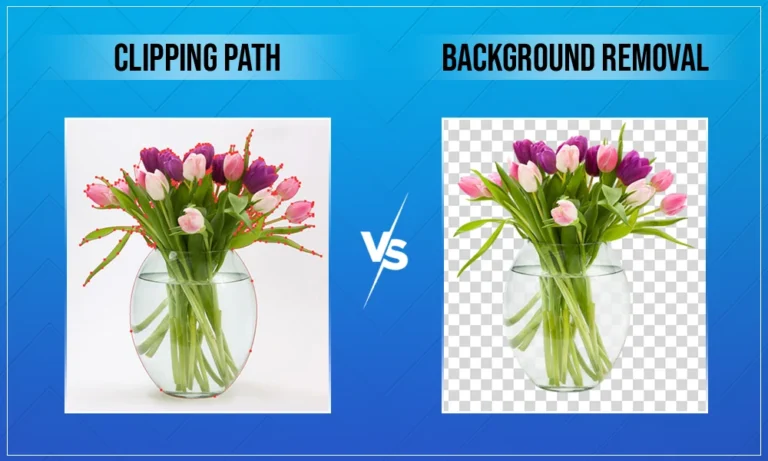
Clipping path references a method of image editing that manually cuts out an object from its background by using Vector Paths. The clipping path technique is most commonly applied using Adobe Photoshop with the Pen Tool, which enables editors to create very precise outlines around an object.
The clipping paths are especially useful in cases where the subject has nice, crisp, or well-defined edges.
Some distinguishing features of the clipping path are:
- Manual process (100%)
- Uses Vector Paths
- Ideal for simple to moderately complex objects
- Produces a crisp, clean edge
Some common scenarios in which a clipping path is used:
- e-commerce product images (shoes, electronics, bottles)
- Catalog images
- Print Quality Images
- Images that require a solid colour background or a transparent background
Because clipping paths are done manually, they allow for a great deal of precision when working with objects that have straight or smooth edges.
2. What Is Background Removal?
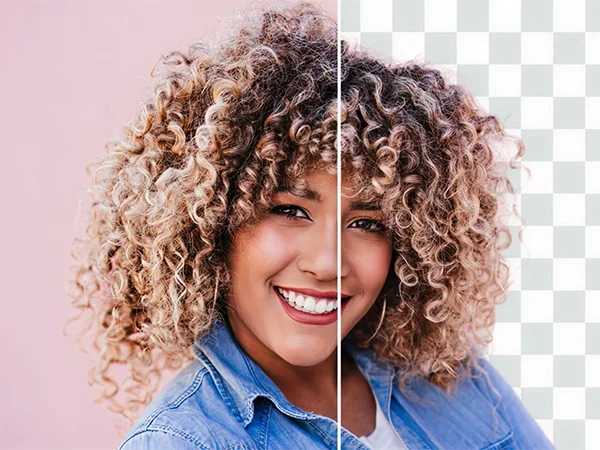
Removing a photo’s background is generally referred to as “background removal” regardless of what you’re calling it or what technique was used to accomplish this purpose.
When we talk about background removal, we typically talk about different ways to remove or replace a photo’s background. Therefore, background removal doesn’t have to be completed using only one technique.
Background removal can be accomplished using the following methods:
- Using clipping paths
- Image masking
- AI tools
- Using layer masking
This versatility of background removal is particularly advantageous to images that are:
- Have fur, feathers, or hair,
- Are transparent or semi-transparent,
- Have shadows and/or other reflections,
- Have very complex or uneven edges.
In conclusion, background removal tends to be more versatile than other methods; it emphasizes the final results as opposed to only focusing on the actual methods that accomplished that result.
Key Differences Between Clipping Path and Background Removal
Both methods utilize various techniques to accomplish the same task of isolating an image, however the way they perform this task varies greatly based on their level of complexity. Here is how the two methods can be compared:
| Aspects | Clipping Path | Background Removal |
| Best For | Products with hard sharp and well defined edges. | Images with soft edges, complex details, hair, fur or transparency. |
| Edge Handling | Creates very clean, sharp and precise edges. | Preserve natural, soft, and realistic edges. |
| Used | Mostly in photoshop or similar software. | Layer masks, selection tools, AI tools, channels and sometimes clipping paths. |
| Complexity Handling | Not suitable for fine details. | Ideal for complex subjects and fine details. |
| Shadows and Reflections | Usually removed, need be added if required separately. | Can retain natural shadows and reflections. |
| Background Type | Best for a solid or plain background. | Works well with busy, textured, or uneven backgrounds. |
Therefore, if you have a clean and simple image, the clipping path will do its job well. But if the image has very detailed textures, the safest method would be to use a background removal process.
When to Use Each Technique
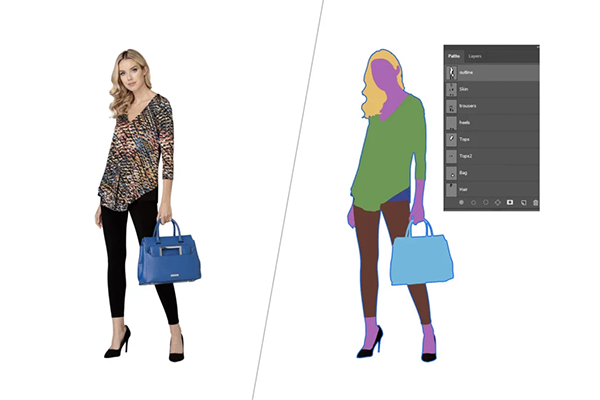
Whenever I have to decide if I’m going to use a clipping path or just remove the background, the first thing I do is check the image and how it’s going to be used.
Use clipping path when:
- If the image has hard, sharp or defined edges.
- To create clean, sharp, precise edges.
- When you need white or transparent background.
- If you need consistency across multiple images.
Use background removal when:
- If the image has fur, hair or any other fine details.
- You want to retain the original shadow and depth for a realistic look.
- To blend subject and background perfectly together.
- When the project is related to lifestyle or other creative use.
In case you are still having trouble deciding between clipping path and background removal, please get in touch. Visuals Clipping offers a free trial in which our professional editors will apply correct technique to your product photos for you.
Conclusion
There are a few things that make the two processes different. Clipping paths are used to provide precise control of an object’s shape and consistent results when working with simple objects. Removing backgrounds gives you more freedom in working with complex images.
The most important thing to consider when using either technique is deciding which method is appropriate for the project and the type of project. When both are applied correctly, images will improve dramatically and help your goods to stand out against all other sellers’ products in today’s vastly expanding, increasingly competitive internet-based marketplace.
If quality is important to your business, then choosing the right way to use these processes can be crucial for you and your business. You can also go for services like Visuals Clipping that can do amazing work.
FAQs (Frequently Asked Questions)
Q1. Is clipping path better than background removal?
Ans: Not always. Clipping path is better for simple objects, while background removal works better for complex images.
Q2. Can clipping paths remove backgrounds completely?
Ans: Yes, clipping paths can fully remove the background but only for images with clean, well-defined edges.
Q3. Is AI background removal reliable?
Ans: AI tools are fast, but they often miss fine details like hair, fur, shadows and struggle with accuracy.
Q4. Which method is best for eCommerce images?
Ans: Clipping paths are ideal for most standard eCommerce products, while background removal is better for lifestyle or model images.
Q5. Can both techniques be used together?
Ans: Absolutely. Many professional editors often combine clipping paths with background removal for the best results. This is a standard workflow at Visuals Clipping.